Solvetus Labs
Pervius
Unofficial client for FastVPN
An open-source Linux desktop app for connecting to FastVPN.
Status
- Current version
- 1.0.1
- Ubuntu
- Available now as a .deb package. Tested on Ubuntu 26.10 (aarch64); other releases may work but are untested.
- Debian
- The same .deb package, not tested yet.
- Fedora
- Planned, as an RPM.
Features
Location search
Search by city, country, code or alias (UK, USA, Holland…), with country flags, favourites and a UDP/TCP switch.
One-click connect
Pick a location and press Connect.
Connection details
Your ISP IP and the VPN exit IP, hidden until you reveal them, plus Switch IP, traffic totals, connected time and the protocol in use. Switch IP is a reconnect and can return the same exit IP.
Auto-reconnect
If an established tunnel drops, Pervius reconnects after short, increasing delays (2 to 60 seconds), with a countdown and a Stop button. It never retries a failed first connection, a rejected password or a manual disconnect. A real unexpected drop has not been verified live yet.
Tray icon
Status line and connected time, plus connect, favourites, location and kill-switch actions from the system tray.
Desktop notifications
Notices for connection drops and recovery while the window is hidden.
Start at login
Optional. Pervius starts hidden in the tray.
Kill switch
Optional. While armed it blocks all IPv4 and IPv6 traffic outside the Pervius tunnel (trusted only as a real tunnel device), except the VPN servers, DHCP on the local network and the interfaces you choose, and you can still change location or protocol. A small root service, authorised through polkit, does the work with nftables; the app itself never runs as root. It never arms itself and a reboot turns it off, but quitting or crashing the app leaves it armed.
IPv6 and DNS leak protection
Active while connected, whether or not the kill switch is on and whether or not the app is running. All DNS goes through the tunnel, and IPv6 outside the IPv4-only tunnel is blocked. The IPv6 part can be turned off in Settings.
Strict profile validation
The public server catalogue is checked before use; unsupported or unsafe OpenVPN directives are rejected, not ignored. NetworkManager does the privileged work, so the app runs as your user.
Password in the system keyring
Saving it is optional. A NetworkManager secret agent supplies it on request; it is stored in the desktop keyring, never in the VPN profile and never in plain text, and is never shown again (only Replace and Forget).
Five languages
English, European Portuguese, French, Spanish and Italian, following the system language or chosen in Settings.
Screenshots
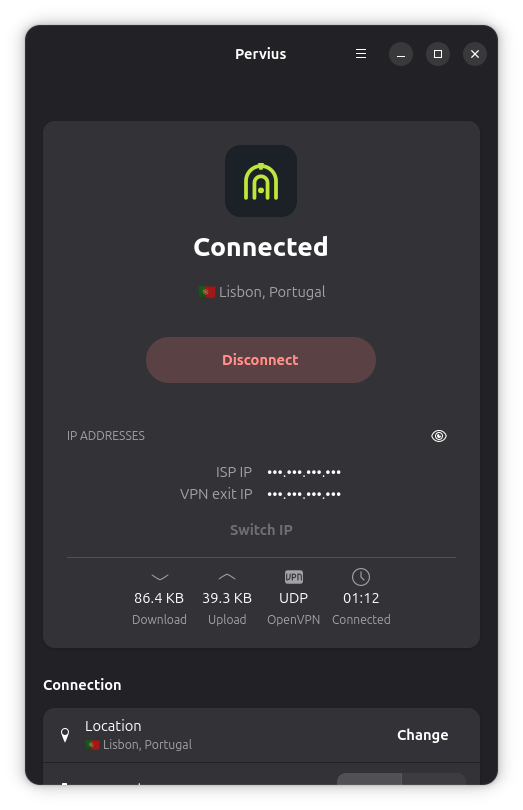
Connected 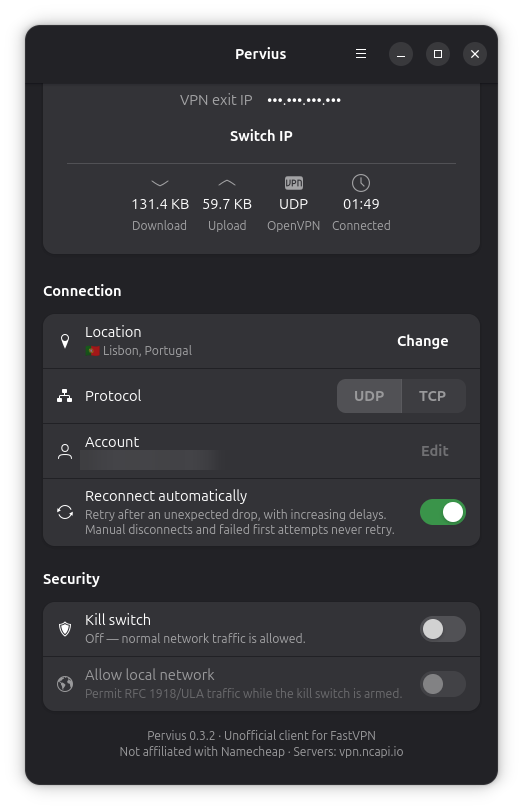
Security settings 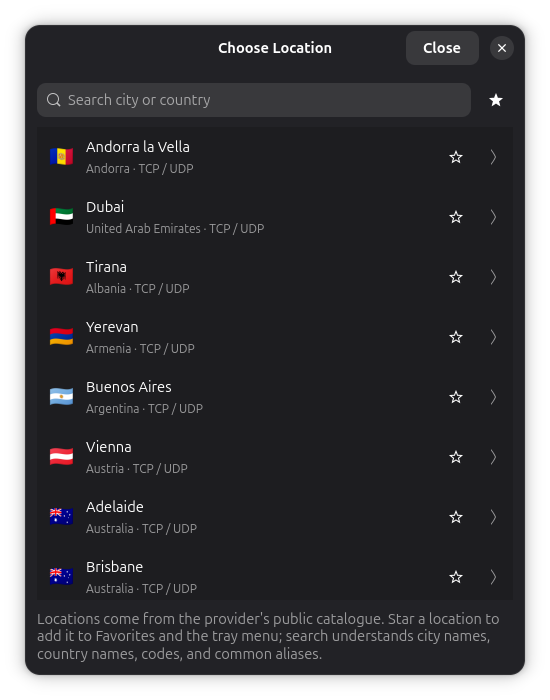
Choosing a location
Install
Download the .deb package and the SHA256SUMS file from the latest release on GitHub, verify the checksum, then install it with apt. The exact commands are in the README.
Download the latest release opens in a new tab
Installation commands in the README opens in a new tab
The packages are not signed yet, so the checksum is how you verify them.
Planned
- A Launchpad PPA, so apt can keep Pervius up to date
- A Fedora RPM through COPR
Why no Flatpak or Snap
The kill switch is a small root service controlled through polkit. Flatpak and Snap sandboxes do not allow that, so Pervius ships as native packages.
Requirements
An active FastVPN (OpenVPN) subscription. Pervius is a client, not a VPN service: it does not provide servers or accounts.
Privacy and network
Pervius has no telemetry and no update checks, and it sends nothing to Solvetus Labs. No Solvetus servers are involved. Besides the VPN connection itself, it makes exactly two kinds of HTTPS calls:
- It downloads the public FastVPN server catalogue from vpn.ncapi.io.
- It looks up your public IP address (the ISP IP and the VPN exit IP shown in the connection details) through api64.ipify.org — a third-party service that sees your IP address. The addresses stay hidden until you press the eye button, and if Pervius starts while already connected, the ISP IP is not shown, because learning it would mean sending traffic outside the tunnel.
Open source
Pervius is released under the Apache-2.0 licence. Issues and contributions are welcome on GitHub. The repository is in English only; the app itself is available in five languages.
Security reports
To report a vulnerability, email security [at] solvetus.com.
You can also use GitHub's private vulnerability reporting, which is enabled on the repository.
Frequently asked questions
Is Pervius an official FastVPN app?
No. Pervius is an independent, unofficial open-source project by Solvetus Labs. It is not affiliated with, endorsed by or sponsored by Namecheap, Inc.
Do I need a FastVPN subscription?
Yes. Pervius is a client for an existing FastVPN (OpenVPN) subscription. It does not provide a VPN service.
Does Pervius collect any data?
No telemetry, no update checks, and nothing is sent to Solvetus Labs. It downloads the public server list from vpn.ncapi.io and looks up your public IP through api64.ipify.org, a third-party service that sees your IP address.
Does Pervius protect against DNS and IPv6 leaks?
Yes, while connected: all DNS goes through the tunnel and IPv6 outside the IPv4-only tunnel is blocked, whether or not the kill switch is on and whether or not the app is running. The IPv6 part can be turned off in Settings. The optional kill switch adds a full block of everything outside the tunnel.
Which Linux distributions work?
Ubuntu, with a .deb package tested on Ubuntu 26.10 (aarch64). The same package should install on Debian but has not been tested. A Fedora RPM is planned.
Why is there no Flatpak or Snap?
The kill switch needs a root service and polkit, which those sandboxes do not allow.